Shared page management
Create upload pages that belong to the workspace, not just one personal account.
Team workspace
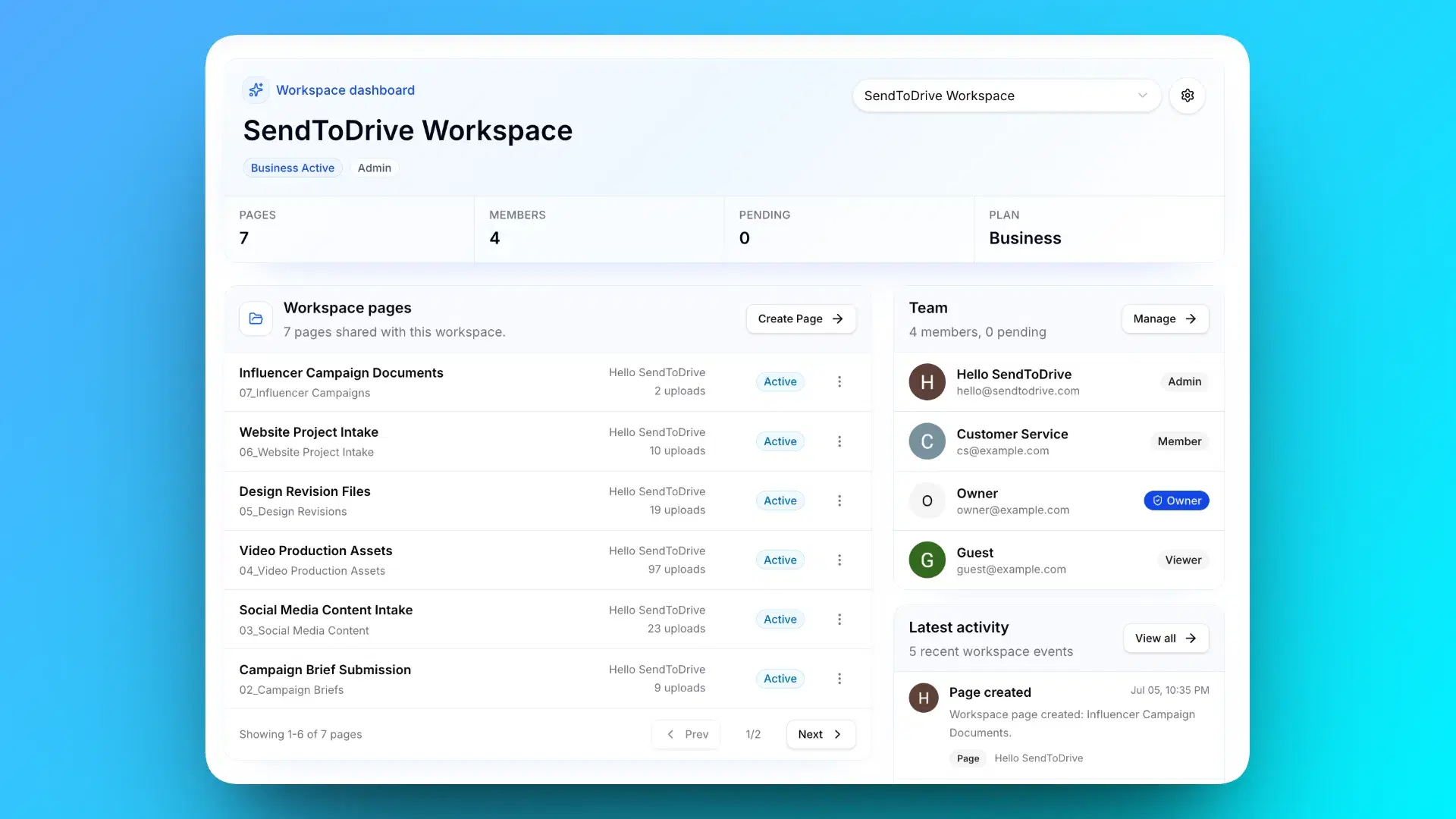
SendToDrive workspaces give teams one place to manage upload pages, route submissions to Google Drive, invite teammates, and keep client intake organized.
Business workspace
Pages, roles, and Drive uploads
Use one workspace for client assets, hiring documents, school submissions, internal reviews, or any file request flow that more than one person needs to manage.
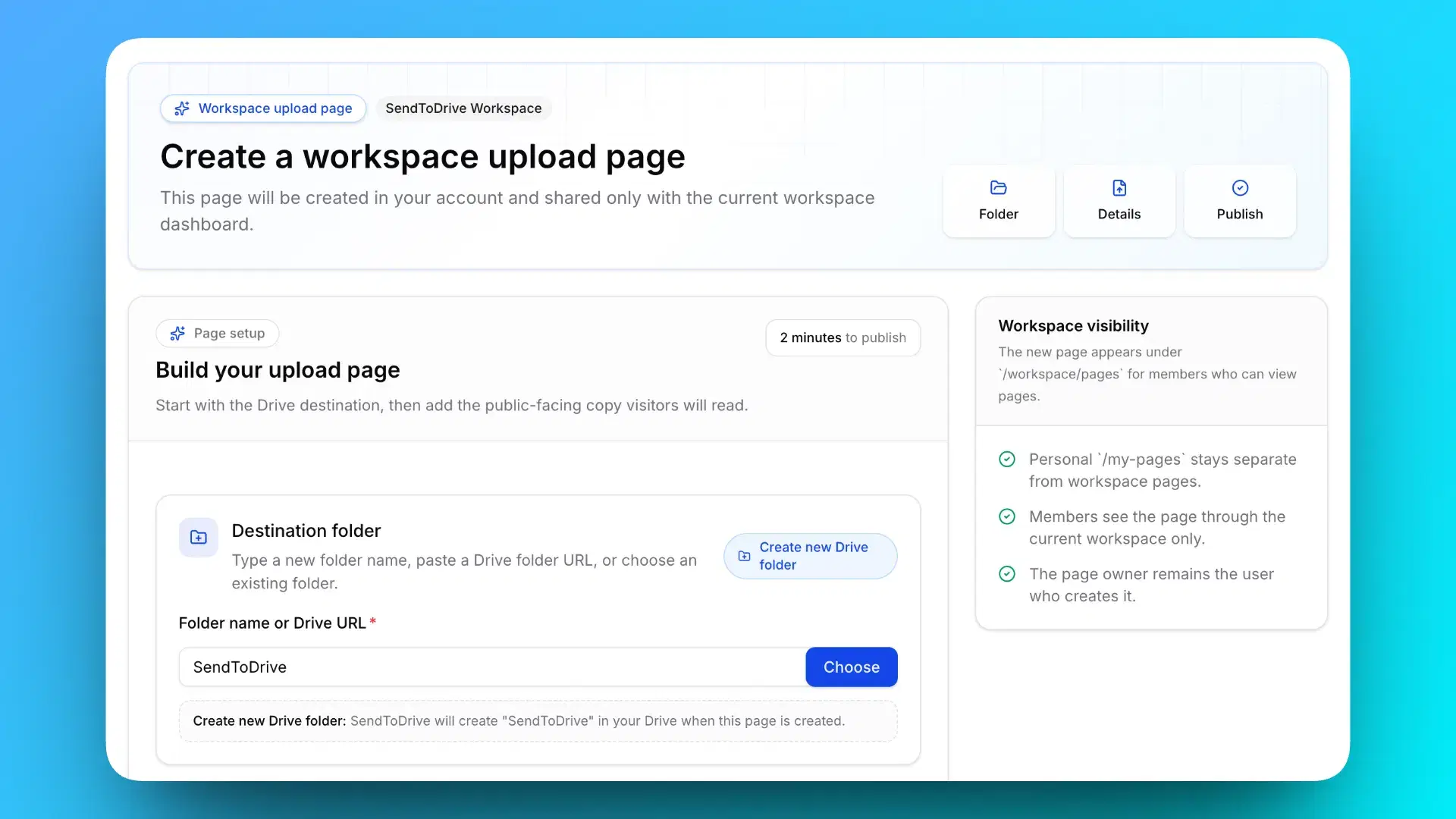
Create upload pages that belong to the workspace, not just one personal account.
Invite people with access levels that fit how your team reviews, edits, and manages pages.
Keep uploads landing in predictable Google Drive folders with submission details attached.
Uploaders do not need Drive access, a Google account, or instructions about which folder to use. They only see the upload page you share.
Send a link or QR code to clients, vendors, students, candidates, or field teams.
Avoid granting folder access just to receive files from people outside your team.
Use the Business plan for workspace-level features and simple seat billing.
Workspace features
A workspace is the shared control room for team file collection. It keeps pages, teammates, permissions, and billing tied to the organization instead of one individual account.
See shared upload pages, teammate access, subscription status, and workspace settings from one place.
Create pages for departments, projects, client intake, hiring, classrooms, events, or recurring document requests.
Invite teammates as owner, admin, member, or viewer so each person gets the right level of access.
Track active members and pending invites, then add extra seats when the team grows.
Keep Business billing attached to the workspace so team access is not tied to one personal plan.
Review workspace activity across pages, teammates, ownership, and billing changes.
Uploaders use a clean upload link or QR code while files continue landing directly in your selected Google Drive folders.
Use cases
Business workspaces are most useful when file collection is repeated, shared by multiple people, or needs a reliable record of who changed what.
Collect creative assets, signed forms, project briefs, brand files, and revisions from clients without shared folders.
Receive resumes, portfolios, IDs, certificates, and onboarding documents in the right Drive folders.
Let students or participants submit assignments, certificates, or registration files through simple upload pages.
Use links or QR codes to collect photos, reports, inspection files, or event documents from mobile users.
Create controlled upload pages for drafts, finance documents, compliance files, or multi-step reviews.
Give external partners a clean file submission path while keeping your Drive permissions private.
Activity log
As teams grow, file intake becomes an operational process. The workspace activity log gives owners and admins a clear trail of important changes so handoffs, billing updates, and page edits do not disappear into chat messages.
Recent activity
Workspace audit trail
Track page creation, deletion, duplication, and updates to page settings or configuration.
See invites, accepted invites, removed members, and role changes in one timeline.
Keep visibility into seat syncs, subscription updates, cancellations, and billing profile changes.
Personal Premium included
Business is not a separate, stripped-down team tier. Each workspace gets the advanced upload-page controls from Personal Premium, then adds workspace ownership, teammates, activity visibility, and seat billing on top.
Create as many upload pages as you need for clients, departments, projects, events, or recurring requests.
Every submission can be organized into its own Google Drive folder so files do not pile up in one messy location.
Rename uploaded files automatically with templates such as date, upload ID, client name, email, or unique code.
Add a password to private upload pages when links should only be used by approved people.
Keep important pages active without the free-plan expiration limit, or set a custom deadline for temporary requests.
Get notified when files arrive so the right person can review submissions faster.
Download CSV reports for submission tracking, reconciliation, or internal documentation.
Remove SendToDrive branding and make upload pages feel more aligned with your business or client process.
Route uploads into different Google Drive folders automatically based on answers in your custom form.
Send uploaders an automatic confirmation after their files are successfully received.
Restrict access to approved emails or domains, with optional access codes for private upload flows.
Keep the simple link and QR code upload experience, direct-to-Drive delivery, and no-login uploader flow.
Business plan
Business is the workspace plan for teams that need shared upload pages, teammate roles, and predictable seat billing.
Business
Business billing is currently available in USD only.
Start with the upload experience your clients or team members need, then let SendToDrive handle the collection path into Google Drive.
Set up a shared space for the team, then invite the people who need access.
Build pages for projects, departments, events, hiring roles, or recurring document requests.
Every upload lands in Google Drive so the team can keep using the workflow it already knows.
FAQ
A few practical answers about Business workspaces, seats, Premium features, and how files move into Google Drive.
Personal Premium is for one user managing advanced upload pages. Business includes everything in Personal Premium, then adds workspace-owned pages, teammate roles, activity logs, workspace-level billing, and seats for a team.
Business includes 2 seats per workspace. Extra seats are $4.99/user/month, up to 50 total seats per workspace.
No. Uploaders use the upload link or QR code you share. They do not need Google Drive access, a SendToDrive account, or access to your workspace.
Files are uploaded directly to your selected Google Drive folders. SendToDrive is built around direct-to-Drive collection, not replacing your storage system.
The activity log records important workspace events such as page changes, teammate invites and role updates, ownership transfer activity, and billing or subscription changes.
Yes. Business workspaces are designed for repeatable file intake across client projects, HR documents, classrooms, vendor submissions, operations, and internal reviews.
Business workspace
Create a workspace when file collection has outgrown one person, one inbox, or one shared folder.
Business workspace ready
$9.99 / workspace / month
Included seats
2
Max seats
50